
Website Security · Real estate · Ontario
How We Removed Fake CAPTCHA Malware the Same Day We Found It
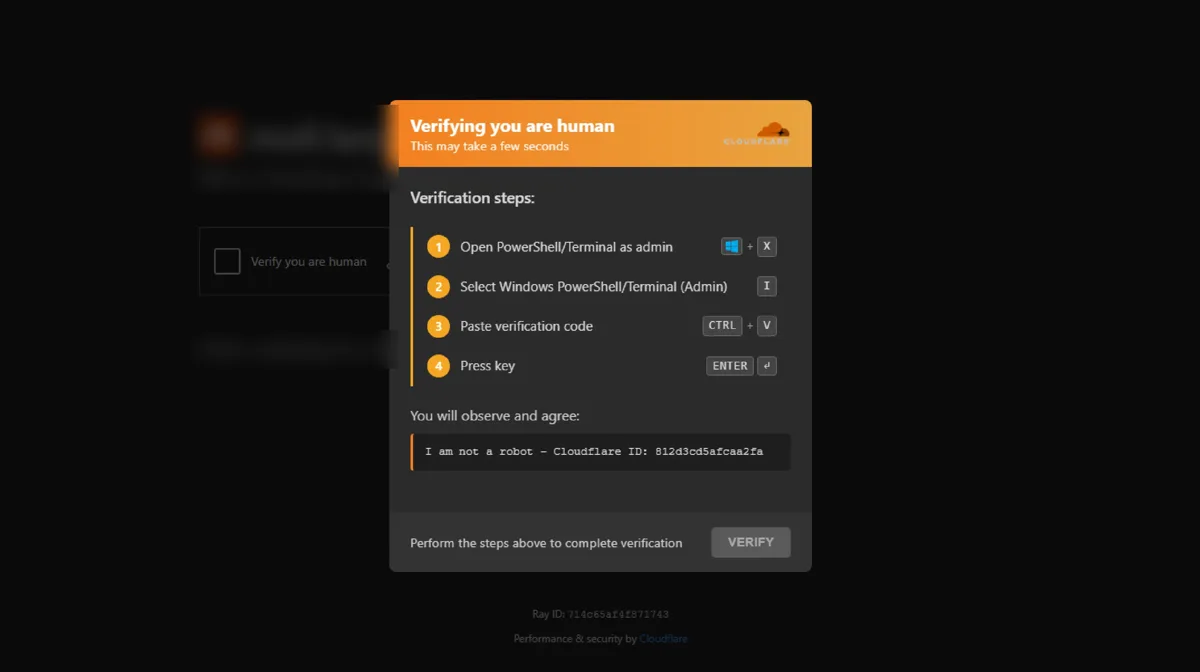
On a long-weekend Sunday in September 2026, we spotted something wrong on a client’s website. The client is an Ontario real estate company. Instead of the homepage, visitors saw a box that looked like a Cloudflare “verify you are human” check.
The Challenge
The box was fake. It asked visitors to press a few keys, step by step, to “verify”. Those keys quietly ran a hidden command on the visitor’s own computer. Security researchers call this a “ClickFix” attack. It is used to install password-stealing malware. For a business whose customers trust its website, this was a serious risk to both visitors and reputation.
What We Did
We moved the same day, on a holiday weekend:
- Confirmed the attack and took the infected code out of the site the same day
- Scanned the rest of the site for anything left behind
- Checked the live site from a clean device to confirm visitors saw the real homepage again
- Added a security firewall that watches for known plugin and theme flaws. We now run it on every site we manage
The Result
We found the attack on a holiday Sunday and fixed it on that same Sunday. Visitors stopped seeing the fake check, and the site now has a firewall watching for known weak spots.
Why It Matters for You
You can’t always tell your site is hacked. This one looked like a normal security check. Our care plan includes regular checks and security monitoring, so someone is watching even on a long weekend.
Common Questions
What is a fake CAPTCHA or “ClickFix” attack?
A hacked website shows a fake “verify you are human” box. It tells visitors to press keys that open a command window and paste a hidden command. That command installs malware on the visitor’s own computer.
Does a real Cloudflare check ever ask you to press keys or paste code?
No. A real check is a single click or runs on its own. Any check that asks you to open PowerShell or the Run box, or to paste something, is an attack. Close the page.
How do I know if my website is showing this?
Visit your site in a private window, on a phone and on a computer, and from outside your office network. Infected sites can hide the box from logged-in admins. If you see it, take the site offline and call your web team.
Services behind these results
Talk to Kumar
This isn’t a sales call. It’s a 20-minute strategy session where Kumar personally walks you through exactly where your search visibility is leaking and what it would realistically take to fix it.
No automated PDF. No pitch deck. No junior account rep. Just Kumar, your numbers and goals.
No shortcuts. No black-hat. Clear monthly updates.